 Or use this link to go directly to the settings: chrome://settings/keyboard-overlay
Enjoy :-)
Or use this link to go directly to the settings: chrome://settings/keyboard-overlay
Enjoy :-)--- title: "Caps Lock button on Chromebook" date: 2014-02-15T14:44:02 author: Mithun category: tips tags: [chromebook, capslock, enable-caps-on-chromebook] reading: ~1 min ---
# Caps Lock button on Chromebook
Google Chromebooks comes without a caps lock key. There are few ways by which you can get the caps lock key.
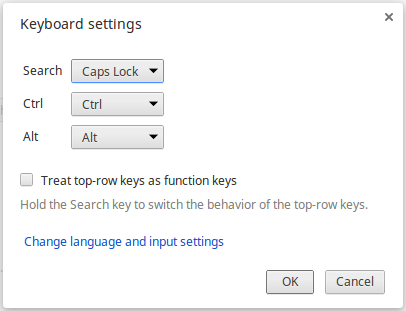
One way is by turning the Search button into a Caps Lock.
To do this you have to go to “Keyboard Settings” under the “Settings” menu, and select "Caps Lock" under the "Search" drop-down menu.
Or use this link to go directly to the settings: chrome://settings/keyboard-overlay
Enjoy :-)
Or use this link to go directly to the settings: chrome://settings/keyboard-overlay
Enjoy :-)