µ
mithun madhusoodananakamantleCurve@mithun.co:~$
001
002
003
004
005
006
007
008
009
010
011
012
013
014
015
016
017
018
019
020
021
022
023
024
025
026
027
028
---
title:    "Resize bluestacks on mac osx"
date:     2014-01-29T18:17:34
author:   Mithun
category: none
reading:  ~1 min
---

# Resize bluestacks on mac osx

    1. Open the file com.BlueStacks.AppPlayer.plist from ~/Library/Preferences/ using any text editor
    2. Find the text Framebuffer
    3. Below Framebuffer you can see height and width Screen Shot 2014-01-29 at 17.56.21
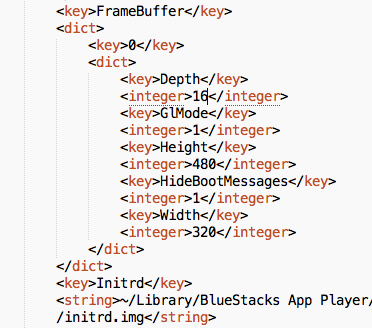
    4. Specify the height and width you wish to use
    5. Now change the following line
RestartGuestOnFrontendLaunch 0 to RestartGuestOnFrontendLaunch 1 Now save, exit and open Bluestacks :)
## comments (5)
  1. kenny· 2015-05-26

    Howdy Mithun,
    Thank you so much for putting the instructions to changing the size of the bluestacks--it was driving me insane not to see the entire display, but google found your site and vectored me in here for the solution...kenny

  2. Jaden· 2016-02-02

    where can you find the line RestartGuestOnFrontendLaunch

  3. Mithun· 2016-02-03
    RestartGuestOnFrontendLaunch can be found just above the FrameBuffer
  4. harisingh· 2016-05-01

    On my machine, this file was located under /Users/singh/Library/Preferences folder. Thanks for the headsup

  5. akif· 2017-01-27

    last version of bluestacks 2 for Mac haven't this article, how make this

    thank you

NORMAL~/none/resize-bluestacks-in-mac-osx/● main
utf-8LFmd● rec2026-05-17 19:24